Fabric mods for Minecraft

Run auctions & gambles without the spreadsheet.

Two client-side mods that read the /pay messages in your chat and do the bookkeeping: an auction house with live bids and a timer, and a gamble queue that knows who paid, who's in range and who's next.

Fabric 1.21.11 26.1 - 26.3 Client-side only No Fabric API needed
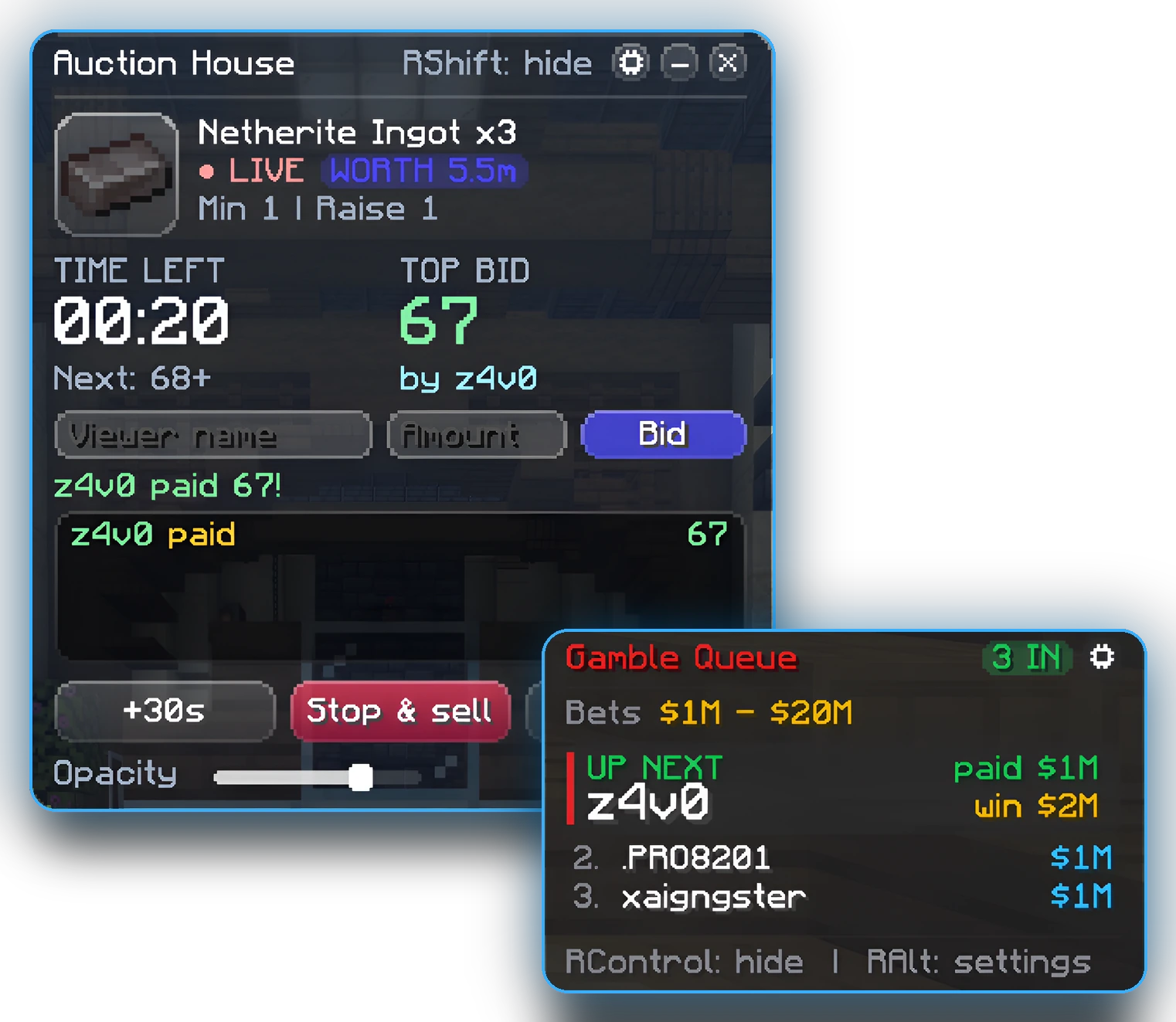
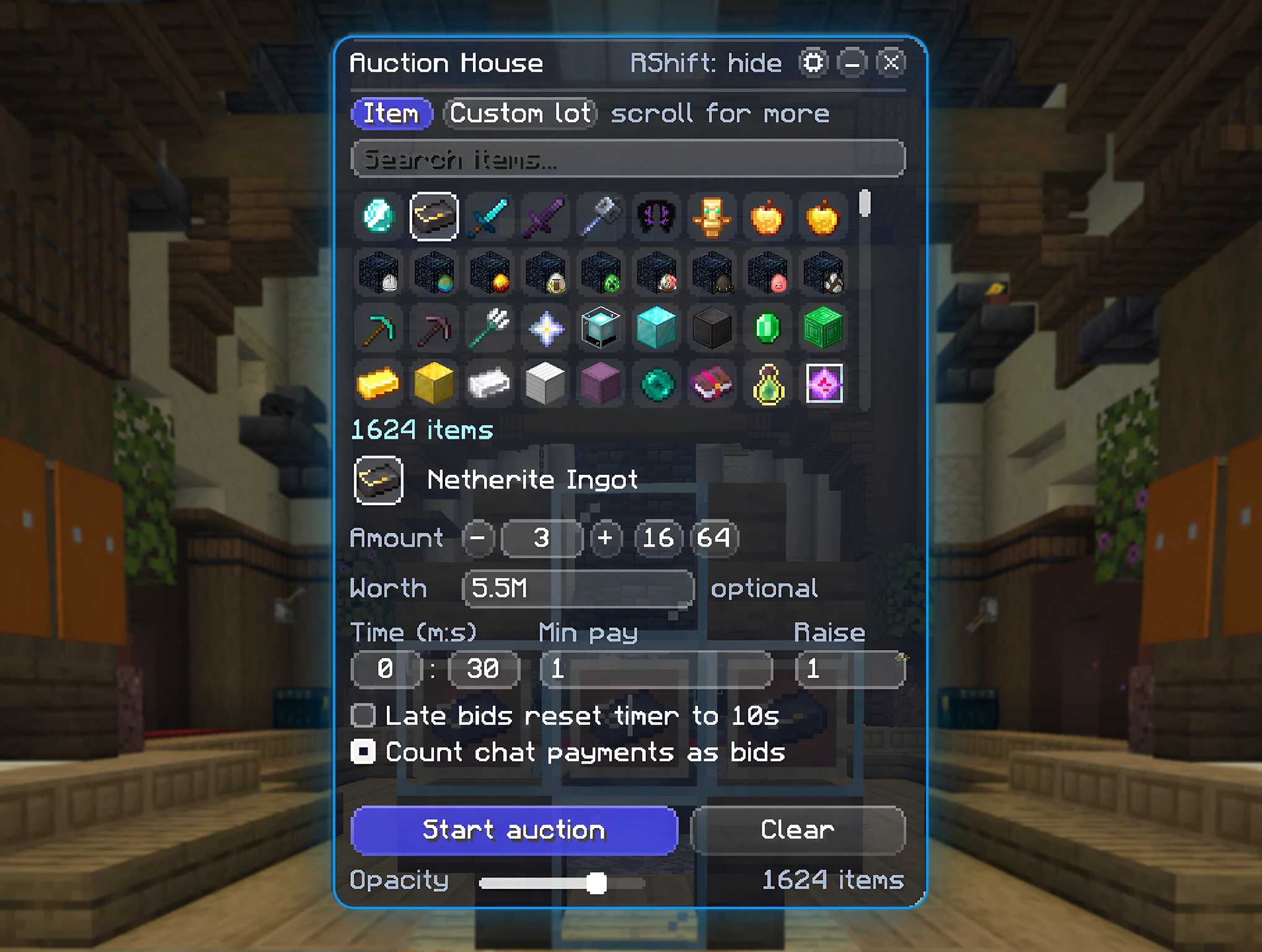
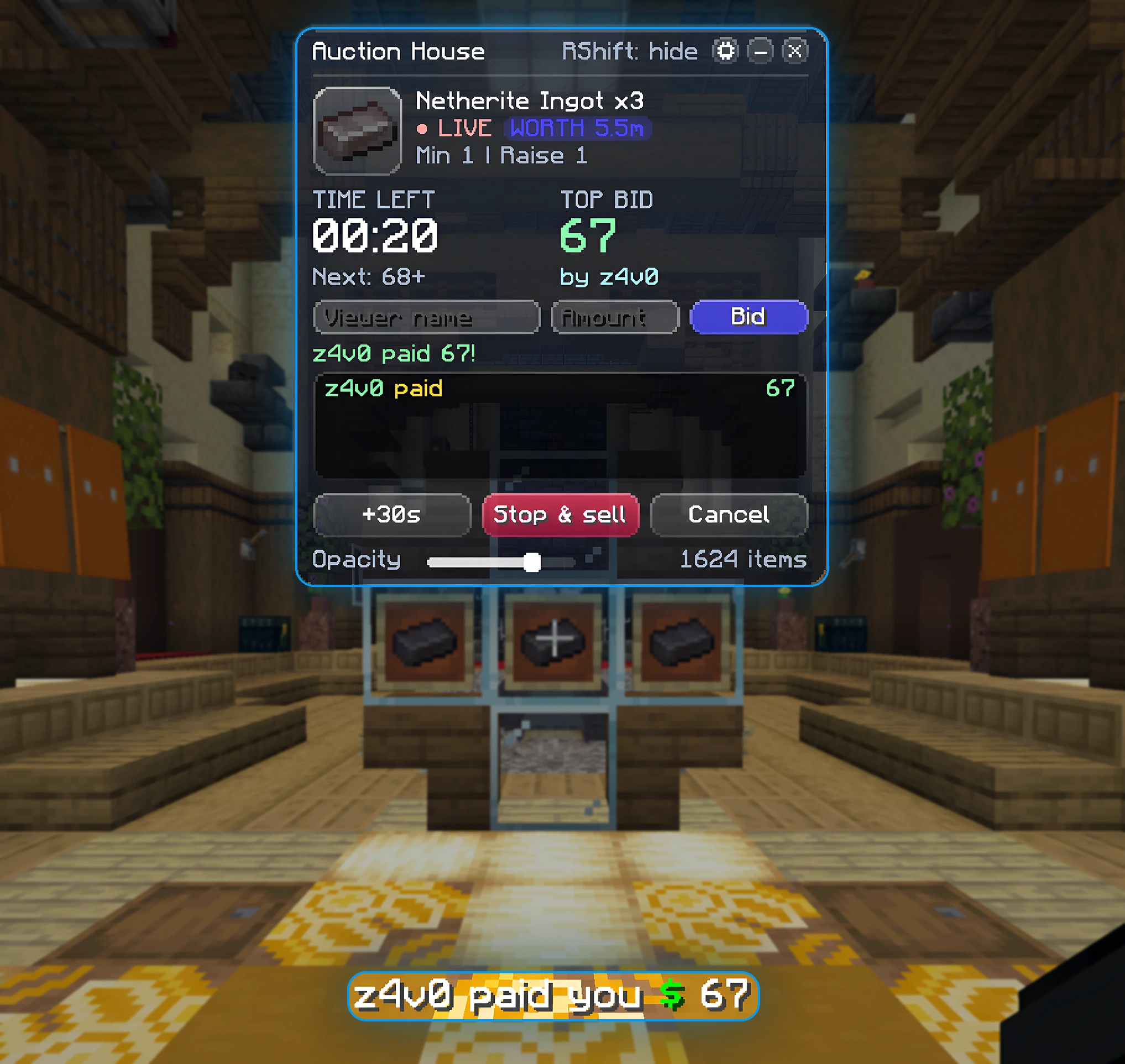
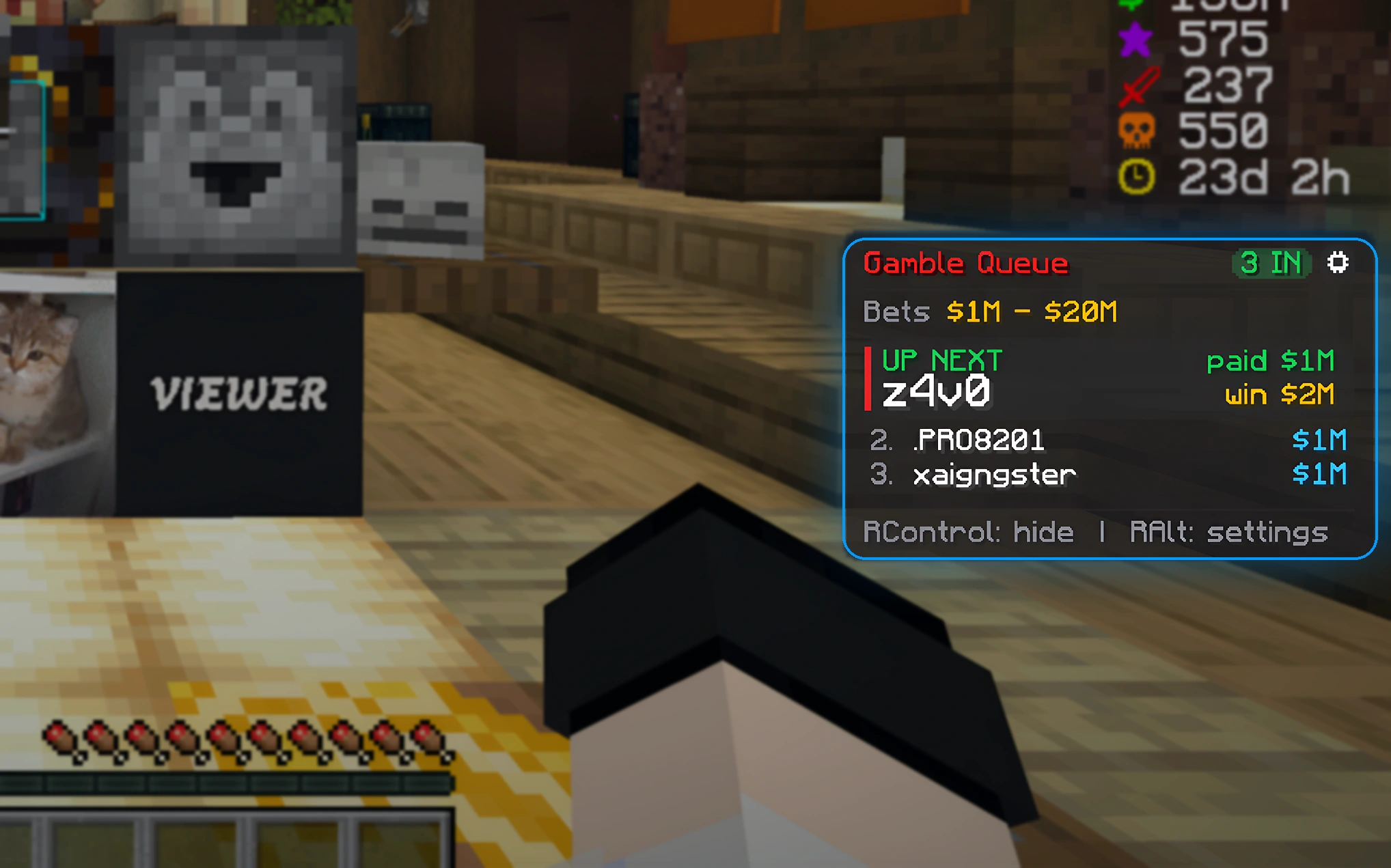
The real Auction House panel during a live auction, and the Gamble Queue card showing who's up next
The mods

Two tools, kept separate.

Install one or both. Each one is its own small jar and stays out of the way until you tap its key.

Auction Overlay

An auction house panel inside the game
  • Pick any item from a searchable grid, set the timer, minimum bid and raise amount
  • Payments in chat count as bids automatically, or type bids in by hand
  • Late bids reset the timer so nobody can snipe the last second
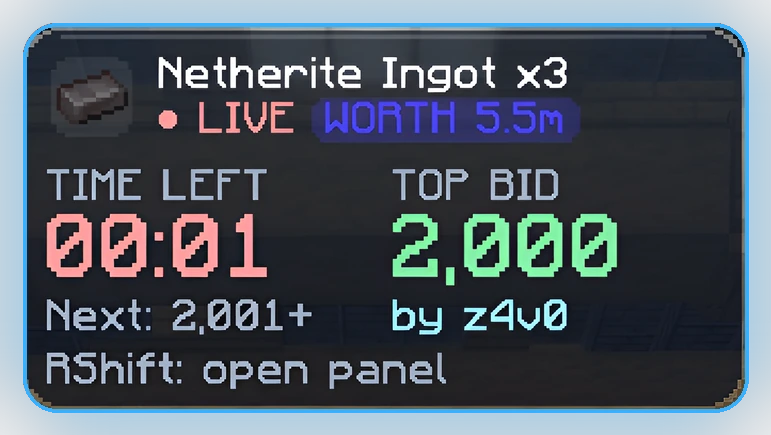
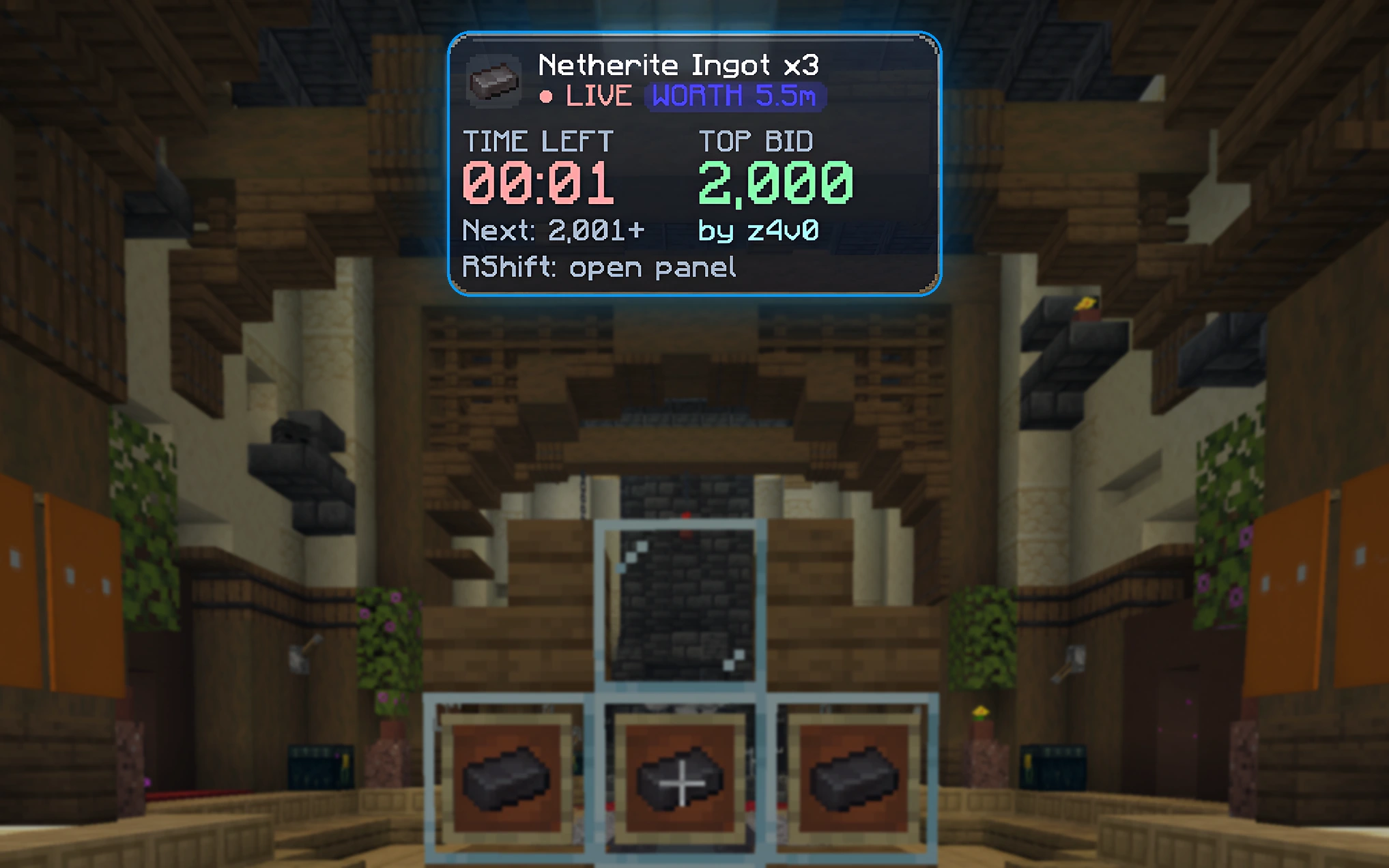
  • On-screen card with the top bid, next bid, worth and countdown
  • Writes a live text file for OBS so viewers see the auction on stream
The auction card that stays on screen while an auction runs
Everything about Auction Overlay →

Gamble Tracker

A queue of everyone who paid you
  • Set a min and max bet; everyone who pays in range joins the queue in order
  • Payments outside the range go to a separate refund list
  • One key moves to the next player; undo if you slip
  • Strict payment matching, so a fake message in chat can't jump the queue
  • Every payment is logged to a file, so you can always check who paid what
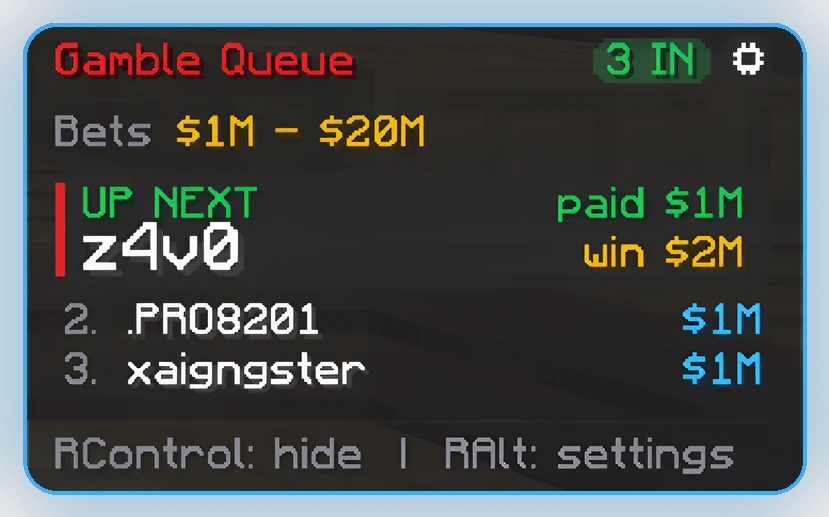
Gamble queue card showing the next player and what they win
Everything about Gamble Tracker →

Screenshots show a paid look (Basic & Premium). Free editions use the Classic Minecraft look with your choice of accent color.

In game

See it on a real server.

Real screenshots from a live server. Click any of them to see it full size.

Pricing

Start free. Upgrade when you want more.

One-time purchase. Every paid edition works on every supported Minecraft version - download the one you play on, any time.

Auction Overlay

Free
$0
  • Full auction panel, timer, bids & OBS file
  • Payments counted as bids automatically
  • Any item + Skeleton Spawner
  • Classic look, 10 solid accent colors
  • Every spawner type
  • Custom lots
  • All looks & styling
  • Auto-copy tpa for the winner
  • First to pay mode
  • Sleek look, queue, Dutch auctions, OBS overlay & more
Download free
Basic
one-time
  • Everything in Free
  • Every spawner type
  • Custom lots: many items, your own name and logo, saved presets
  • 6 looks incl. Liquid Glass, gradient & custom colors
  • Corners, title, text shadow, worth banner styles
  • Auto-copy tpa for the winner
  • First to pay mode
  • Sleek look, queue, Dutch auctions, OBS overlay & more
Buy Basic
Everything
Premium
one-time
  • Everything in Basic
  • First to pay: "first to pay 5m after the countdown gets 10m", winner picked automatically
  • Early and late payments listed for refunds
  • Auto-copy pay for the winner's prize
  • Sleek look: smooth, rounded, no pixels, smooth text
  • Auction queue: lots start one after another by themselves
  • Reserve price, buy-it-now and several winners per lot
  • Dutch auctions: the price drops until someone pays
  • Animated OBS overlay + Discord posts for start, bids and sales
  • Hotkeys for +time, sell, cancel and a copy-ready chat announcement
  • Sales history & stats, last-sold price guide, click-to-copy refunds
  • Countdown bells, block list, custom payment message for other servers
Buy Premium

Gamble Tracker

Free
$0
  • Queue of everyone who paid in your bet range
  • Refund list, undo, next-player key
  • On-screen card & payment log
  • Hands-on tutorial the first time you play
  • Classic look, 10 solid accent colors
  • Copy / send pay to the winner
  • Pay-winner key & payout multiplier
  • All looks & styling
Download free
Everything
Premium
one-time
  • Everything in Free
  • Auto-copies pay <name> <winnings> when a new player is up
  • Pay-winner key sends the payment in one tap
  • Pick the payout: 1.5x, 2x, 2.5x or 3x
  • 7 looks incl. the new smooth Sleek look, Liquid Glass, gradient & custom colors
Buy Premium
Download

Get the right jar.

Pick the mod, the edition and your Minecraft version, then continue to its download page.

Install

Set up in two minutes.

  1. Install Fabric

    Get Fabric Loader from fabricmc.net, or pick Fabric when making a profile in Modrinth, Prism or CurseForge.

  2. Add the jar

    Put the jar for your version in the mods folder. Only one version per mod.

  3. Join your server

    Start the game with the Fabric profile and join the server you run auctions or gambles on.

  4. Tap the key

    The panel opens with a quick tap. Every key can be changed in the settings.

Auction panelRight Shift
Gamble card on / offRight Ctrl
Gamble panel & settingsRight Alt
Next playeryou choose
FAQ

Questions

Which version should I download?

The one that matches the Minecraft version on your launcher profile. "26.1 - 26.1.2" covers 26.1, 26.1.1 and 26.1.2. If you pick the wrong one, the launcher tells you which Minecraft it needs instead of crashing.

Do I need Fabric API?

No. The mods only need Fabric Loader.

Does it work on my server?

Both mods run only on your game and read the payment messages your server sends, like Steve paid you $1M or You received $1M from Steve. That covers most economy plugins. Check your server's rules on client mods before using them.

Can someone fake a payment in chat?

Neither mod reads normal player chat, only messages from the server. Gamble Tracker and First to pay go further: the whole message has to be the payment line, so a DM like [Steve -> You] Bob paid you $10m can't count. In regular auctions every bid is listed in the bid history, so check it against your balance before handing the item over.

What about Bedrock players with a dot in their name?

Names like .BedrockBob are kept exactly as they are, dot included, so copied tpa and pay commands go to the right player.

Does the mod send anything without me knowing?

From Auction Overlay 1.3.4 and Gamble Tracker 1.2.1, the mods ask zzmods.com once per game start whether there's a newer version, so they can tell you about updates. They also send a few anonymous counts every 10 minutes (minutes used, auctions run and sold, bids, payments tracked, your edition and version) under a random install number. Never player names, chat, amounts, servers or anything about your account. The stats can be switched off in the mod's settings (Auction: gear > About, Gamble: panel > About); switching update checks off hides the update cards, but the mod still asks (sending only its name and version) whether its version has a required update, because a broken version can be switched off until you update. The only command a mod ever sends in game is the Premium gamble pay-winner key, and only when you press it. Premium's Discord posts only go to a webhook you add yourself. The first-time tutorial asks you to link the mod to your zzmods account (one click on your account page). A linked copy checks in every 30 seconds: it sends your Minecraft name and the same usage counts to your account (unless you switch stats off), and it picks up test payments our support team sends you (never real money, never paid out). Unlink any time in the mod or on your account page.

I bought a paid edition. How do I get it?

Create a free account, pay with PayPal or a card, and you land on My downloads: pick your Minecraft version and download that jar. It stays in your account, so you can download it again any time (for another version too). Your settings carry over from the Free edition: just swap the jar. Every edition (Free too) only works while linked to a zzmods account; paid editions to the account that bought them.

Contact

Talk to us.

Questions, bugs, ideas or help with an order - Discord is the quickest way to reach us.